DV360 Has Been Telling You Who Saw Your Ads. Soon It Will Also Tell You Who Was Supposed To.
There is a question that sits behind almost every campaign report that nobody has had a clean way to answer inside DV360: did the campaign actually reach the people it was set up to reach, or did it find its own audience?
Starting Q3 2026, that question gets easier to answer. And for anyone running campaigns where audience precision matters as much as volume, it is one of the more useful reporting changes Google has made in a while.
What is actually changing
The existing Age and Gender metrics are being renamed Age (Adjusted) and Gender (Adjusted). They work the same way they always have: modeled estimates of who Google thinks saw your ads, based on available signals. The rename just makes explicit what was always true, that these numbers are approximations built on inference, not observation.
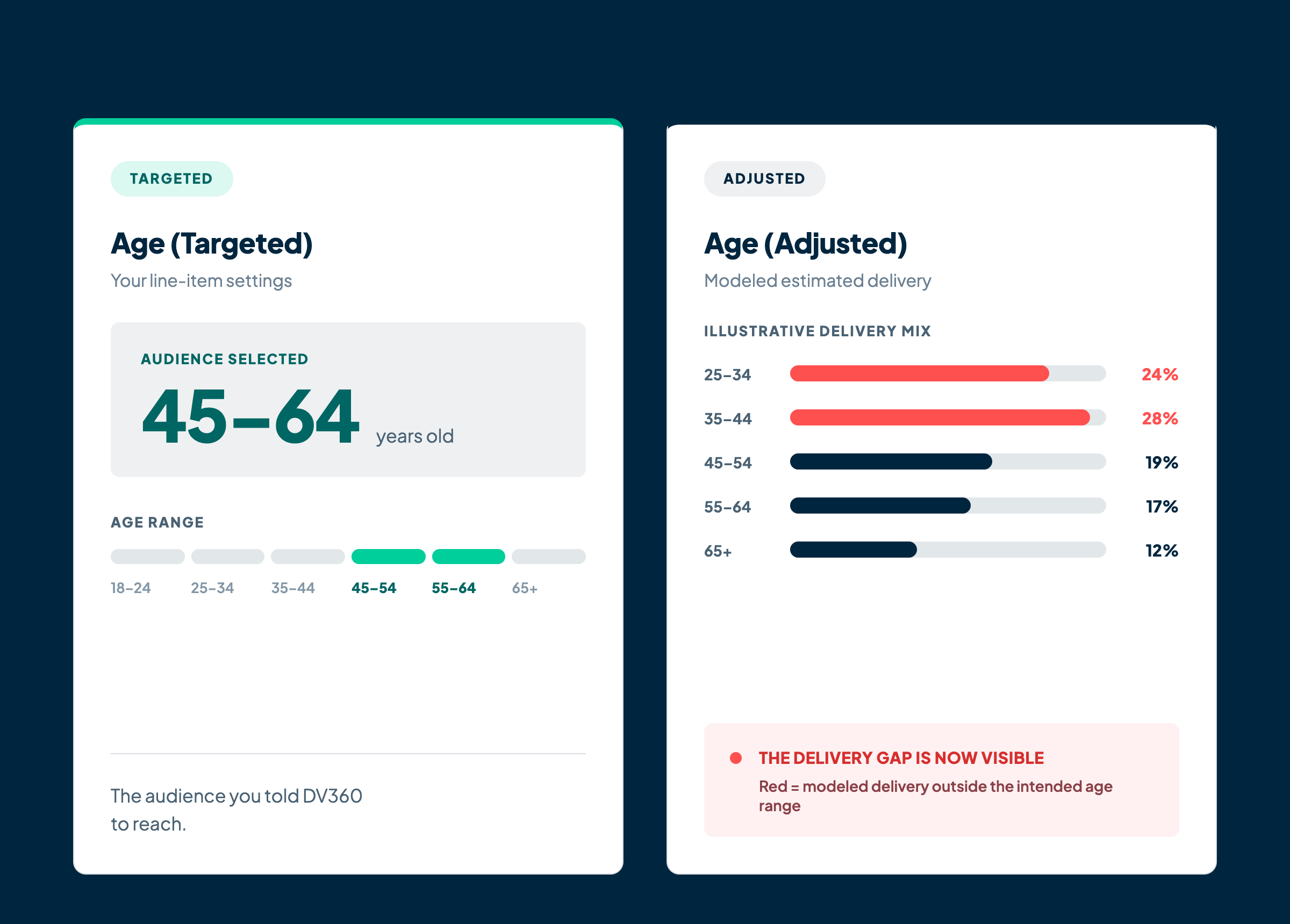
What is new is Age (Targeted) and Gender (Targeted). These reflect the demographic parameters set in the line item, the audience you told the platform to reach. They are not estimates. They are the instructions you gave the system.
Four metrics where there used to be two. The rename is housekeeping. The addition is the part worth paying attention to.
Why this matters more than it looks
The gap between Adjusted and Targeted is where honest campaign evaluation lives. If you set up a campaign to reach 45 to 64 year-olds and Age (Adjusted) shows strong delivery to a younger segment, that is not just a reporting anomaly. It is a signal about how the algorithm interpreted your targeting, where it found inventory, and whether the audience you paid to reach is the audience that actually saw the message.
Until now, answering that question required cross-referencing line item settings against delivery reports manually, which most teams do not do consistently. Having both numbers in the same place removes that friction. It makes the comparison routine rather than investigative.
For any campaign where reaching the right person matters as much as reaching a lot of people, this kind of visibility changes how performance gets evaluated. A campaign that hit its impression targets but skewed significantly off its demographic target is not the same as a campaign that delivered on both. The new metrics make that distinction visible in a way it was not before.
This is the kind of reporting improvement that does not generate much noise at launch but quietly changes how teams think about delivery over time. We think it is worth taking seriously.
The part that will break things if you ignore it
The rename is where the operational risk sits. Any dashboard, automated report, or data pipeline pulling Age or Gender by column name will stop working in Q3 when the old column names disappear. The data does not go away. The column names do. Depending on how your reporting is set up, this might surface immediately as an error or it might just look like missing data for a week before someone investigates.
Updating column references to Age (Adjusted) and Gender (Adjusted) takes a few minutes per report. Not doing it means a reporting gap at a time when you probably need the data.
Get the must-read newsletter for digital fundraisers.
Written by Delve Deeper team members in the thick of the work, the newsletter explores practical solutions for challenges like disconnected data, weak segmentation, lack of personalization, and inefficient media.